Open source
Groundhog: catch every email your app sends while you build
A local email inbox for development and tests. Point your app at it over SMTP or the send API it already uses, and every sign-up code, password reset and receipt shows up at localhost:3025. Nothing leaves your laptop.
Start it (Node 20 or newer)
npx @groundmail/groundhogOr with Docker
docker run --rm -p 1025:1025 -p 3025:3025 ghcr.io/groundmail/groundhogFree and open source under the MIT license. Built by Groundmail.

The inbox
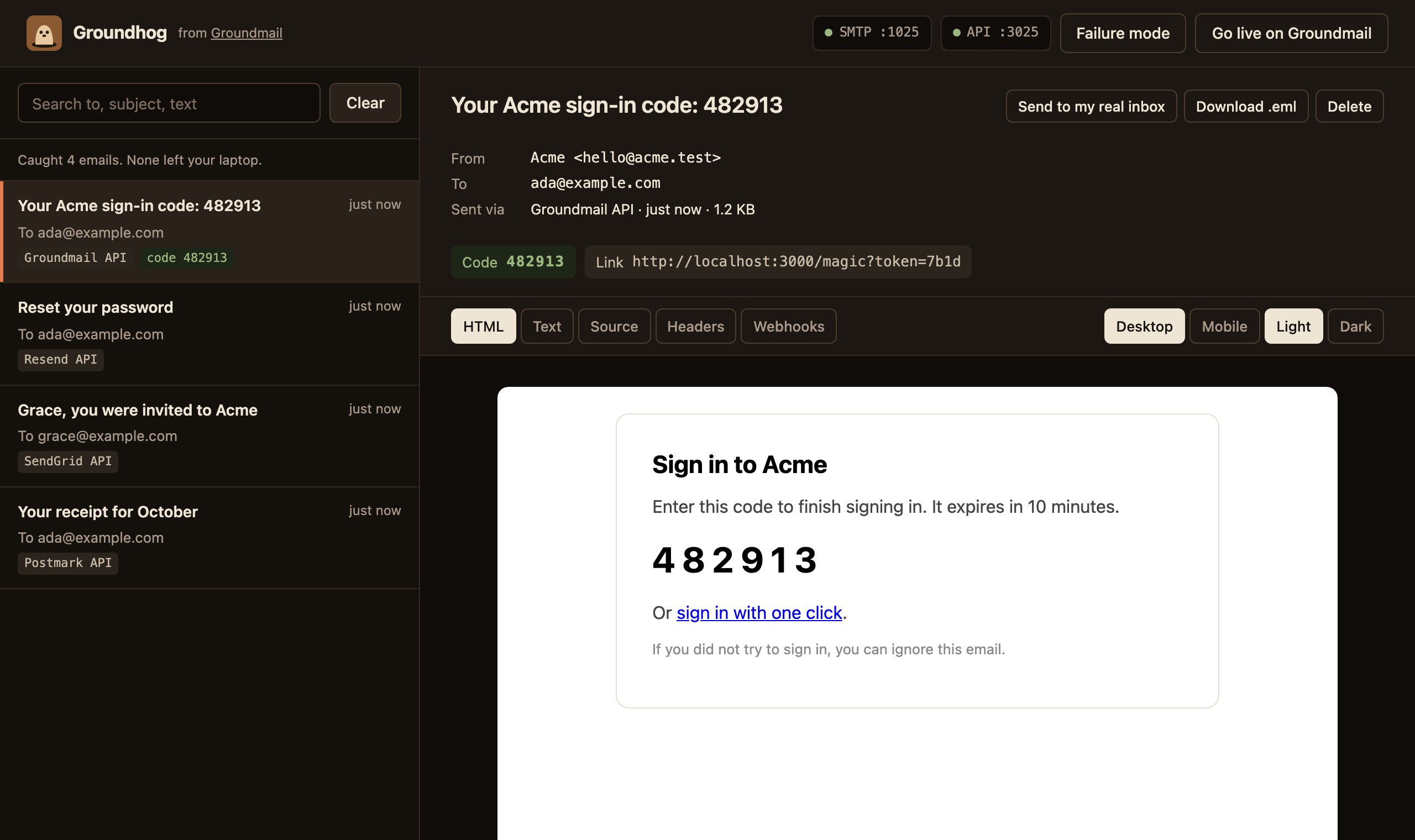
Every email, the moment it's sent
Live updates, HTML, text, source and headers, attachments, desktop and mobile widths, light and dark preview, and the one-time code and links pulled out for you. Each email shows which API it came through.
30-second setup
Point your app at it
Pick the way your app already sends. SMTP is on port 1025; the HTTP APIs are on port 3025, and each provider's official SDK works with a base-URL change, not a code change. Any API key, username or password is accepted.
Nodemailer, Laravel, Rails, Django, Phoenix and anything else that speaks SMTP.
SMTP_HOST=localhost
SMTP_PORT=1025

// Nodemailer
nodemailer.createTransport({ host: 'localhost', port: 1025 })

# Laravel .env
MAIL_MAILER=smtp
MAIL_HOST=127.0.0.1
MAIL_PORT=1025
MAIL_ENCRYPTION=null

# Rails: config/environments/development.rb
config.action_mailer.delivery_method = :smtp
config.action_mailer.smtp_settings = { address: "localhost", port: 1025 }

# Django settings.py
EMAIL_HOST = "localhost"
EMAIL_PORT = 1025
Beyond catching
Test the parts that usually go untested
Failure mode
Most apps have never seen their own error handling run. Make the next sends fail with a 429, 422, 401, an outage or a timeout, in each provider's own error format. SMTP answers with the matching reply code.
curl -X POST localhost:3025/api/faults -d '{"status":429,"next":3}'Webhook simulation
Fire delivered, bounce, complaint, open and click events at your app in the payload and signature format of the provider the email came through. Signatures use fixed local keys, so your verification code runs unchanged.
Send to my real inbox
Some things only show up in a real mail client. Open a caught email, click Send to my real inbox, and see it in Gmail or Outlook through a free Groundmail account. Copies only go to your own address until you verify a domain, so nothing reaches real users by mistake.
MCP for AI coding agents
Coding agents can finish sign-up and password-reset flows on their own by reading the email. Tools include wait_for_email, get_code, get_link and simulate_fault.
claude mcp add groundhog -- npx -y @groundmail/groundhog mcpTesting
Wait for the email, then use it
waitForEmail() waits for a matching email (one that already arrived counts) and gives you its code and links. It works in Playwright, Vitest or any test runner.
npm install -D @groundmail/groundhogPrefer plain HTTP? The same things are on a JSON API, including a long-poll at GET /api/wait.
signin.spec.ts
// Playwright
import { expect, test } from '@playwright/test'
import { waitForEmail } from '@groundmail/groundhog'

test('magic-link sign-in', async ({ page }) => {
  const to = `ada+${Date.now()}@example.com`
  await page.goto('http://localhost:3000/signin')
  await page.getByLabel('Email').fill(to)
  await page.getByRole('button', { name: 'Email me a link' }).click()

  const email = await waitForEmail({ to })
  email.code     // "482913"
  email.links[0] // "http://localhost:3000/magic?token=…"

  await page.goto(email.links[0])
  await expect(page.getByRole('heading', { name: `Signed in as ${to}` })).toBeVisible()
})
Switching
Coming from MailHog or Mailpit
Groundhog keeps SMTP on port 1025, so your app's mail settings stay as they are. The inbox moves from port 8025 to 3025. In Docker Compose, swap the image and the second port.
| Port | MailHog, Mailpit | Groundhog |
|---|---|---|
| SMTP | 1025 | 1025 |
| Web inbox | 8025 | 3025 |
| Provider send APIs | – | 3025 |
docker-compose.yml
services:
  groundhog:
    image: ghcr.io/groundmail/groundhog
    ports: ["1025:1025", "3025:3025"]
FAQ
Common questions
Is Groundhog free?
Yes. Groundhog is open source under the MIT license and runs entirely on your machine. A Groundmail account is only needed for Send to my real inbox.
Does Groundhog ever send real email?
No. Groundhog never relays mail. Nothing it catches leaves your machine unless you click Send to my real inbox.
Do I need to change my code to use it?
No. SMTP apps change the host and port. Apps on an HTTP API change the SDK's base URL; the official Groundmail, SendGrid, Postmark, Mailgun, Resend and Amazon SES SDKs work unmodified. Any API key, username or password is accepted.
Can I keep emails across restarts?
Yes. Emails are kept in memory by default; pass --store with a JSON file path to keep them across restarts.
Source, issues and the full option list are on GitHub. The package is @groundmail/groundhog on npm.
Go live on Groundmail
When it's time to ship, Groundmail sends your app's email for real, over an HTTP API or SMTP. The free plan includes 3,000 emails a month. If you use the Groundmail SDK, going live is two environment variables.
GROUNDMAIL_API_KEY=gm_live_… # and drop GROUNDMAIL_BASE_URL