Short answer
GoDaddy doesn't create DKIM keys for other services: the service that sends your mail does. Copy its DKIM record (a selector, plus either a TXT key or a CNAME target), then in GoDaddy open your Domain Portfolio, select the domain, select DNS, then Add New Record, and choose TXT or CNAME to match. In Name, enter selector._domainkey without your domain, paste the key or target into Value and select Save.
Most DKIM problems at GoDaddy come from those two fields: a full host name in Name, which puts the record at selector._domainkey.example.com.example.com, or a key that was cut short, wrapped in quotes or broken across lines. Check it with dig +short TXT selector._domainkey.example.com, then send a real message and look for dkim=pass with your domain.
What a DKIM record is, and where yours comes from
DKIM lets receivers check that a message really came from a server allowed to sign for your domain and wasn't changed on the way. The sending service signs each message with a private key and names a selector in the signature; receivers fetch the matching public key from selector._domainkey.yourdomain in DNS.
So the record always comes from the service that sends the mail, and each service has its own selector. The record takes one of two forms:
- TXT: the public key itself, a value starting
v=DKIM1; k=rsa; p=followed by a few hundred characters. - CNAME: a pointer to a key the provider hosts, so it can rotate the key without you touching DNS again.
| Who sends the mail | Type | Name in GoDaddy | Where to get the value |
|---|---|---|---|
| Google Workspace | TXT | google._domainkey (the default selector) | Google Admin console, Gmail, Authenticate email |
| Microsoft 365 | Two CNAMEs | selector1._domainkey and selector2._domainkey | Microsoft Defender portal, DKIM settings for the domain |
| GoDaddy Professional Email | Two CNAMEs | secureserver1._domainkey and secureserver2._domainkey | GoDaddy's Email & Office Dashboard |
| A transactional email provider | TXT or CNAME | The selector the provider shows, e.g. s1._domainkey | The provider's domain or DNS settings page |
Selectors differ between services and sometimes between accounts, so always use the exact name your provider shows. Different selectors live side by side; adding one never replaces another.
If you can't find the selector, open a message the service already sent, view the original, and look at the DKIM-Signature header: s= is the selector and d= is the domain it signs for.
Add the DKIM record in GoDaddy, step by step
Step 1: Copy the record from your email service
In your email service's dashboard, find the DKIM record for the domain and note three things: the type (TXT or CNAME), the host or name, and the value. Use its copy button if it has one. Copying a key out of a PDF or an email can add spaces or line breaks that break it.
Step 2: Open the domain's DNS in GoDaddy
Sign in to your GoDaddy Domain Portfolio, select the domain to open Domain Settings, then select DNS. Check the list for a record that already uses the same name. If you're replacing an old key, edit that record instead of adding another: one name can hold one DKIM key, and a CNAME can't share its name with any other record.
Step 3: Add a TXT or CNAME record
Select Add New Record and choose TXT or CNAME from the Type menu, matching what your service gave you. Microsoft 365 and GoDaddy Professional Email use CNAMEs; Google Workspace uses a TXT key.
Step 4: Enter selector._domainkey in Name
In Name, enter the selector followed by ._domainkey, and stop there: s1._domainkey, not s1._domainkey.example.com. GoDaddy adds the domain itself. If you send from a subdomain such as mail.example.com, keep the subdomain: s1._domainkey.mail.
Step 5: Paste the key or target into Value
For a TXT record, paste the whole key as one line, from v=DKIM1 to the last character, without quotation marks. For a CNAME, paste the target host name. Leave TTL at the default (1/2 Hour).
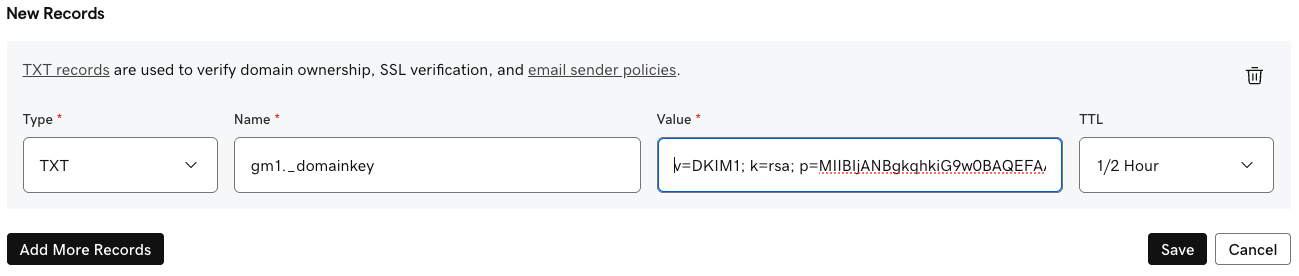
Step 6: Save, then turn signing on
Select Save, or Save All Records if you added two CNAMEs at once. Some services only start signing once they can see the record: Microsoft 365, for example, has you turn DKIM signing on in the Defender portal after the CNAMEs resolve. Give the record up to an hour (GoDaddy allows up to 48 hours), then press verify or enable in your email service.
Pasting a long DKIM key into GoDaddy
A 2048-bit DKIM key makes a TXT value of roughly 400 characters. GoDaddy's TXT Value takes up to 1,024 characters, so it fits in one record: paste it whole, and don't split it into pieces yourself.
A single DNS text string can only hold 255 characters, so behind the scenes a long value is stored as two or more strings in the same record. That's normal: receivers join the strings back together before checking the key. It's why dig can show the key in two quoted parts:
$ dig +short TXT s1._domainkey.example.com @1.1.1.1
"v=DKIM1; k=rsa; p=MIIBIjANBgkqhkiG9w0BAQEFAAOCAQ8AMIIBCgKCAQEAx3…" "…QIDAQAB"- Fine: two or more quoted strings back to back, with nothing between them but a space.
- Broken: quote marks inside a string (
\"), a space or line break in the middle of the key, or a key that ends early. Delete the record's value and paste it again from your provider. - Key length: if your service offers 1024 or 2048 bits, choose 2048. Keys shorter than 1024 bits shouldn't be used any more.
Check that DKIM passes
First confirm the record is in public DNS at the right name, then confirm real mail passes. DNS being right is necessary but not enough: the service also has to sign with the matching private key.
# TXT key: expect "v=DKIM1; k=rsa; p=..."
dig +short TXT s1._domainkey.example.com @1.1.1.1

# CNAME: expect your provider's host name, then the key behind it
dig +short CNAME selector1._domainkey.example.com @1.1.1.1
dig +short TXT selector1._domainkey.example.com @1.1.1.1

# Doubled name? This should return nothing
dig +short TXT s1._domainkey.example.com.example.com @1.1.1.1
Then send a message to a Gmail or Outlook address, open it and view the original (in Gmail, Show original). The Authentication-Results header should read dkim=pass with header.d= or header.i= showing your domain, not your provider's. If it says fail or permerror, the DKIM fail guide matches each reason to its fix.
Common GoDaddy DKIM mistakes
| Mistake | What you see | Fix |
|---|---|---|
| Full host name in Name | Checkers find no key; the record sits at s1._domainkey.example.com.example.com | Edit Name to s1._domainkey |
| Key cut short when copying | dkim=permerror with key syntax error or invalid public key | Copy again with the provider's copy button; compare the end of the key |
| Quotes or line breaks pasted into Value | dkim=fail or permerror | Paste the key as one line with no quotes |
| TXT added where the provider asked for a CNAME, or the reverse | The provider never verifies the domain | Delete it and add the type the provider shows |
| Wrong selector | no key for signature or key not found in the message headers | Match the s= in a real message's DKIM-Signature header |
| Record added but signing never switched on | Mail still signed by the provider's domain, so DMARC doesn't align | Enable or verify DKIM in the provider's dashboard |
| Nameservers aren't GoDaddy's | The record never appears in public DNS | Add it at the DNS host your nameservers point to |
The other email records at GoDaddy (SPF, DMARC, CNAME and MX) are in GoDaddy DNS records for email.
Using Groundmail? Your DKIM record at GoDaddy
Groundmail's DKIM record is a TXT key. The selector is unique to your domain and looks like ss-abc123, so for example.com you'd add:
| Type | Name in GoDaddy | Value (example) |
|---|---|---|
| TXT | ss-abc123._domainkey | v=DKIM1; k=rsa; p=MIIBIjANBgkq… (copy yours from the dashboard) |
It's one of four records needed to verify the domain, with the ownership TXT at _groundmail, the return-path CNAME at rp and your SPF record; the full set is in GoDaddy DNS records for email. Copy the selector and key from any of these:
- Dashboard: open Domains, select the domain, then the DNS records tab. Each record has a copy button, and selecting a row shows the full host and value.
- CLI:
groundmail domains get example.comprints the domain with itsrecords(install withnpm install -g groundmail-cli). - API:
GET /domains/{id}returns the samerecordslist. See the domains docs.
Or skip the copying: on the domain's DNS records tab, choose Other DNS hosts, then GoDaddy, and paste a GoDaddy Personal Access Token. Groundmail writes the DKIM key and the other records for you.
Then select Verify DNS on the domain's page. Home reads your public DNS and names any record it can't find yet, and the DNS records tab marks each record and keeps re-checking while the domain is pending, so you can see which one is missing instead of waiting and guessing. Verifying also switches signing to your own domain, so messages carry a DKIM signature for example.com and DMARC can pass.
New to Groundmail? It sends your app's sign-in codes, password resets and receipts, and the free plan includes 3,000 emails a month with no time limit. Create a free account, add your domain, and the records above are generated for you.
Frequently asked questions
Does GoDaddy generate DKIM keys?
Only for GoDaddy's own email products, such as Professional Email and Microsoft 365 from GoDaddy. For any other service, the key comes from that service and you add it to GoDaddy DNS.
Is a DKIM record a TXT or a CNAME record in GoDaddy?
Either, depending on the service. A TXT record holds the key itself; a CNAME points to a key the service hosts. Add whichever type your email service shows.
What goes in the Name field for DKIM in GoDaddy?
The selector followed by ._domainkey, without your domain: for example s1._domainkey. For a subdomain sender, add the subdomain: s1._domainkey.mail.
Why does a DKIM checker say no key was found?
Usually the name is wrong (the domain typed twice, or a different selector), the record hasn't propagated yet, or the domain's DNS isn't hosted at GoDaddy. Query the exact name with dig and compare it with the s= selector in a real message.
Can a domain have more than one DKIM record?
Yes, one per selector. Google, Microsoft and a transactional provider can all sign for the same domain, each with its own selector and record.
Does a 2048-bit DKIM key fit in GoDaddy?
Yes. GoDaddy's TXT value takes up to 1,024 characters and a 2048-bit key is about 400. Paste it as one line; DNS stores it as several strings, which receivers join back together.
Sources
Facts on this page about other companies' products, prices and policies come from these public pages. They change, so check them before you decide.