Short answer
To add a TXT record in GoDaddy, open your Domain Portfolio, select the domain, select DNS, then Add New Record and choose TXT as the Type. In Name, enter @ for the root domain or only the part before your domain (_dmarc, not _dmarc.example.com). Paste the value from your email provider into Value, leave TTL at its default and select Save. SPF and DMARC are TXT records too; CNAME and MX records use the same form with their own type.
Two things trip people up. A domain can have only one SPF record, so add your new provider's include: to the v=spf1 record that's already there instead of creating a second. And GoDaddy now adds a DMARC record to new domains by itself, so look for an existing _dmarc record and edit it rather than adding another. None of this works unless the domain uses GoDaddy's nameservers.
Before you start: make sure GoDaddy runs your DNS
GoDaddy can only publish records for a domain that uses GoDaddy's nameservers. Plenty of domains are registered at GoDaddy but have their DNS somewhere else (Cloudflare, Vercel, Shopify, a web host). If yours does, records you add in GoDaddy do nothing; add them wherever the nameservers point. Check from a terminal:
dig +short NS example.com

# GoDaddy's nameservers end in domaincontrol.com, for example:
# ns45.domaincontrol.com.
# ns46.domaincontrol.com.
You also need the exact records from the service that sends or receives your mail: the host, the type and the value of each one. Copy them from that service's dashboard rather than retyping them; one wrong character in a DKIM key is enough to break it. If the domain uses GoDaddy's own email, its records are probably already there, so read the existing list before you add anything.
How to add a TXT record in GoDaddy, step by step
The same form adds every record type. These steps use a TXT record, the type behind SPF, DKIM keys, DMARC and most verification records; the sections after this one cover what changes for each.
Step 1: Open the domain's DNS records
Sign in to your GoDaddy Domain Portfolio and select the domain to open its Domain Settings page. Select DNS to see the records the domain already has. Look down the list for a TXT record starting v=spf1 and one named _dmarc before you add anything: if either exists, you'll edit it instead of adding a second.
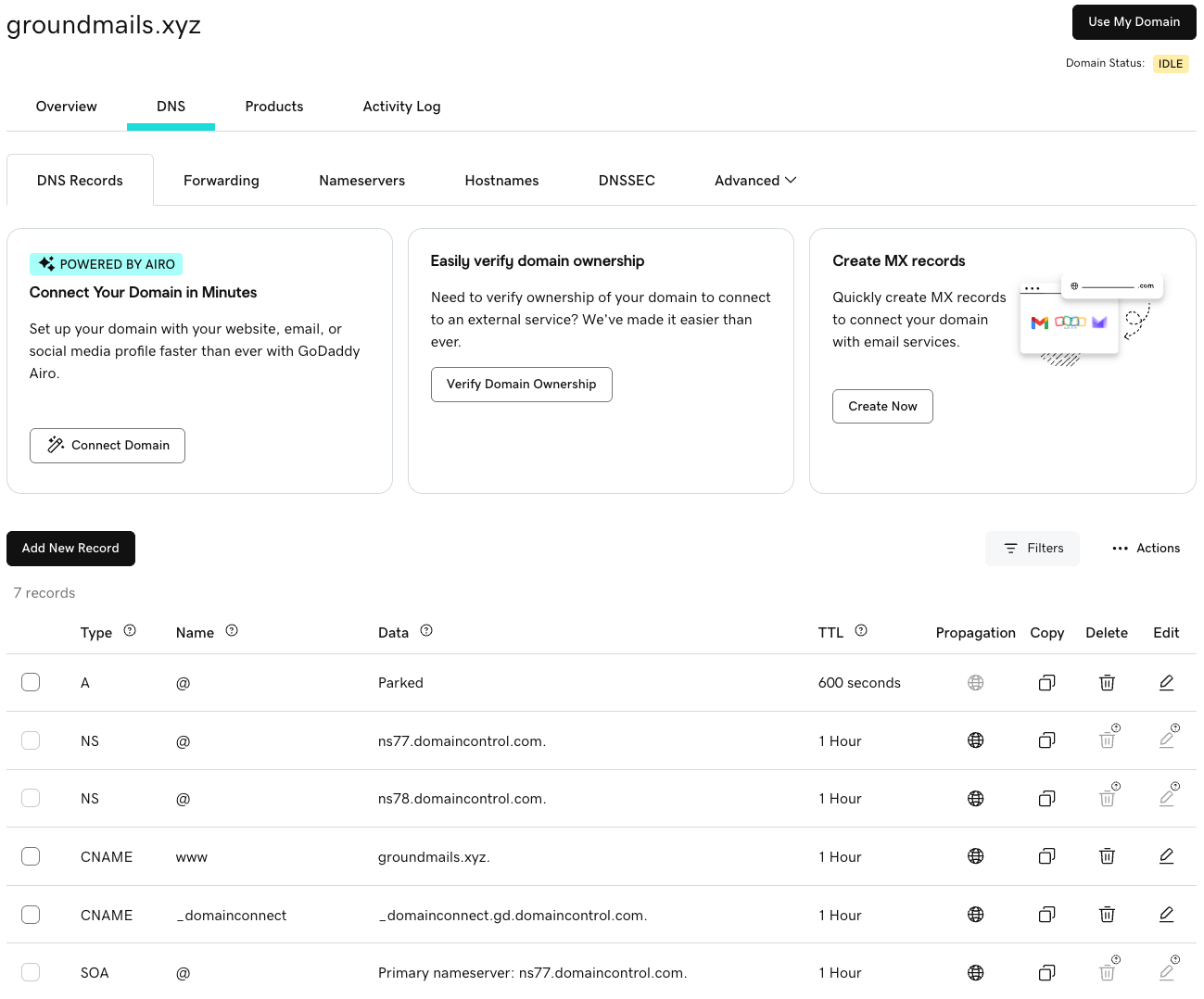
Step 2: Select Add New Record and choose TXT
Select Add New Record, then choose TXT from the Type menu. GoDaddy has no separate SPF type: an SPF record is a TXT record whose value starts with v=spf1.
Step 3: Enter the Name without your domain
Name is where the record lives, written without your domain name. Enter @ to put the record on the root domain (example.com). For anything else, enter only the part before your domain: _dmarc for _dmarc.example.com, s1._domainkey for s1._domainkey.example.com, em123 for em123.example.com.
Your provider may show the full host name. Don't paste it as is: GoDaddy adds your domain to whatever you type, so _dmarc.example.com would end up at _dmarc.example.com.example.com, where no receiver will look.
Step 4: Paste the Value and leave TTL alone
Paste the value into Value exactly as your provider gives it, on one line. GoDaddy's own examples are written without quotation marks, so leave out any quotes your provider wraps around the value. GoDaddy's TXT form takes up to 1,024 characters, which is enough for a 2048-bit DKIM key in one record.
Leave TTL at the default (GoDaddy's form starts at 1/2 Hour). A shorter TTL only helps if you expect to change the record again soon.
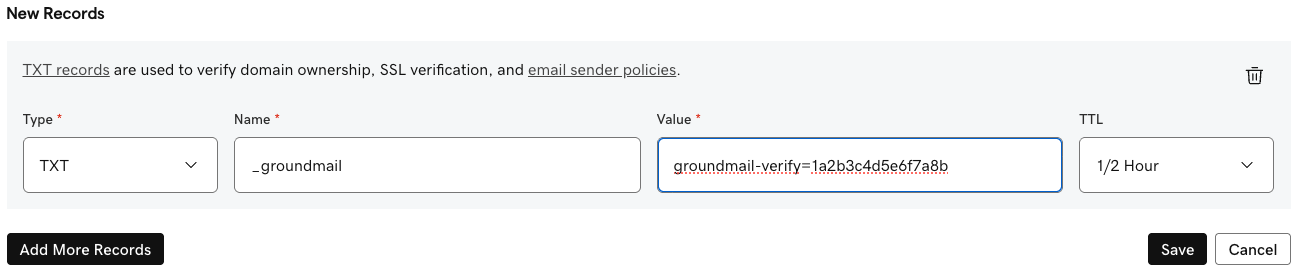
Step 5: Save
Select Save. To add several records in one go, select Add More Records before saving, then Save All Records. If the domain has GoDaddy's Domain Protection, GoDaddy asks you to confirm your identity with a code before the change is saved.
Step 6: Wait, then check the record
GoDaddy says most DNS changes take effect within an hour and can take up to 48 hours to reach everyone. Check the record from outside GoDaddy, as shown in Check that the records work, before you press verify at your email provider. Most "not found" verification errors are a record that is still propagating or has the wrong name.
What to enter for each email record
| Record | Type | Name in GoDaddy | Value (example) |
|---|---|---|---|
| SPF | TXT | @ | v=spf1 include:_spf.example-provider.com ~all, one record per name |
| DKIM key | TXT | selector._domainkey | v=DKIM1; k=rsa; p=MIIBIjANBgkq… |
| DKIM, delegated | CNAME | selector._domainkey | A host name from your provider |
| DMARC | TXT | _dmarc | v=DMARC1; p=none; rua=mailto:dmarc@example.com |
| Return path or bounce domain | CNAME | The prefix your provider names, such as rp | A host name from your provider |
| Domain verification | TXT | @ or the host your provider names | The token your provider gives you |
| Receiving mail | MX | @, or a subdomain such as inbound | The mail server's host name, plus a Priority |
Names are what you type in GoDaddy for example.com. For a subdomain such as mail.example.com, keep the subdomain in the name: _dmarc.mail, selector._domainkey.mail, and mail instead of @.
GoDaddy SPF record: edit the one you already have
Only one SPF record can work on a name at a time; GoDaddy's help says so, and so does the SPF standard. With two, receivers return a permanent error and SPF fails for every message. If the domain uses GoDaddy's email (Professional Email or Microsoft 365 from GoDaddy), it likely already has v=spf1 include:secureserver.net -all. To add a sending service, select Edit next to that record and put the new include: before the all at the end:
Before:  v=spf1 include:secureserver.net -all
After:   v=spf1 include:secureserver.net include:_spf.example-provider.com -all
Keep exactly one all term, at the very end. SPF also allows at most 10 DNS lookups, and each include: counts along with the includes nested inside it, so remove services you no longer use. The SPF checker counts them for you.
GoDaddy DMARC record: check for the one GoDaddy added
Since April 2025, GoDaddy sets up DMARC on every new domain it sells, and it says older domains will get the record later. Its default looks like this:
v=DMARC1; p=quarantine; adkim=r; aspf=r; rua=mailto:dmarc_rua@onsecureserver.net;If your domain has it, edit that record instead of adding a second _dmarc record. Two DMARC records on one name make receivers ignore DMARC for the domain altogether. When you edit it, two parts are worth a look:
rua=is where daily aggregate reports go. GoDaddy's default sends them to GoDaddy, not to you. Change it to a mailbox you read, or a DMARC report service, if you want to see which servers send as your domain. GoDaddy says you can change this address.p=quarantinealready asks receivers to put failing mail in spam. Before relying on it, make sure every service that sends as your domain passes DKIM or SPF for your domain. If you're adding a new service and aren't sure yet,p=nonewhile you read the reports is the cautious setting; tighten it again once they're clean.
If there's no _dmarc record, add one as a TXT record with Name _dmarc. Start with p=none and a rua= address, then move to quarantine and reject as the reports allow. The SPF, DKIM and DMARC guide has the full rollout, and the DMARC checker explains every tag.
GoDaddy DKIM record
A DKIM record is either a TXT record holding a public key or a CNAME that points to a key your provider hosts. Either way, Name is selector._domainkey with your provider's selector, never the full host name. Keys are long, so they need care when pasting; the GoDaddy DKIM guide covers selectors, long keys and how to confirm DKIM passes.
GoDaddy CNAME record
Choose CNAME as the type, enter the prefix in Name (rp, em123, s1._domainkey) and the target host name in Value. GoDaddy doesn't allow @ as a CNAME's name, and a name that already has another record can't take a CNAME, so remove or rename the old record first. Email services only ask for CNAMEs on subdomains, so you won't need the root.
GoDaddy MX record
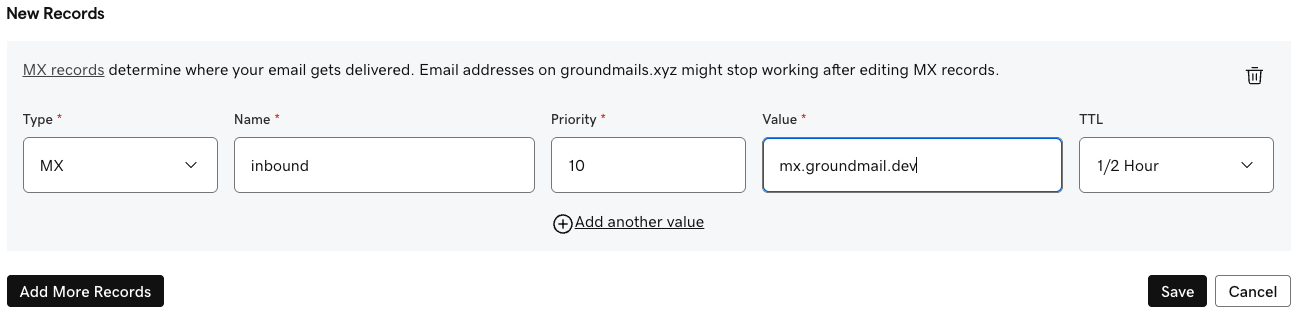
Choose MX as the type. Name is @ for mail to you@example.com, or a subdomain such as inbound for mail to anything@inbound.example.com. Priority sets the order servers are tried, lowest first. Value is the mail server's host name, never an IP address.
MX records on @ decide where all of the domain's email is delivered, and GoDaddy warns that changing them can interrupt the email you already have. If your team's mailboxes are on Google Workspace, Microsoft 365 or GoDaddy's email, leave the root's MX records alone and give a new service that receives mail its own subdomain.
Check that the records work
Ask a public resolver directly, so you see what receivers see instead of a stale local cache. On macOS and Linux, dig is already installed:
# SPF: expect exactly one line starting "v=spf1"
dig +short TXT example.com @1.1.1.1

# DMARC: expect exactly one line starting "v=DMARC1"
dig +short TXT _dmarc.example.com @1.1.1.1

# DKIM: use the selector from your provider
dig +short TXT s1._domainkey.example.com @1.1.1.1

# CNAME and MX
dig +short CNAME rp.example.com @1.1.1.1
dig +short MX example.com @1.1.1.1

# Doubled name? This should return nothing
dig +short TXT _dmarc.example.com.example.com @1.1.1.1
To see a record before caches catch up, ask GoDaddy's nameserver itself: replace @1.1.1.1 with @ and one of the names the NS lookup returned, such as @ns45.domaincontrol.com. On Windows, nslookup -type=TXT _dmarc.example.com 1.1.1.1 does the same job.
Common mistakes in GoDaddy DNS
| Mistake | What happens | Fix |
|---|---|---|
| A second SPF record next to the existing one | SPF permerror: SPF fails for all mail from the domain | Merge both into one v=spf1 record and delete the other |
| Full host name typed in Name | The record lands at _dmarc.example.com.example.com | Edit the record and enter only the part before your domain |
A new _dmarc record next to the one GoDaddy added | Receivers ignore DMARC for the domain | Keep one record; edit GoDaddy's instead of adding another |
| DKIM key cut short, wrapped in extra quotes or broken by line breaks | dkim=fail or dkim=permerror | Re-copy the key from your provider and paste it as one line |
| Records added in GoDaddy while the nameservers point elsewhere | Nothing changes in public DNS | Add the records at the DNS host your nameservers name |
MX records on @ replaced for a new service | Your team's email stops arriving | Restore the old MX records and use a subdomain for the new service |
| Checking straight after saving | The record looks missing and verification fails | Query @1.1.1.1 or GoDaddy's nameserver, and allow up to an hour |
Using Groundmail? Your records at GoDaddy
When you add a domain to Groundmail, you get the records below. Here they are written the way GoDaddy's Name field wants them for example.com:
| Purpose | Type | Name in GoDaddy | Value (example) |
|---|---|---|---|
| Ownership | TXT | _groundmail | groundmail-verify=1a2b3c… |
| DKIM | TXT | ss-abc123._domainkey | v=DKIM1; k=rsa; p=MIIBIjANBgkq… |
| Return path | CNAME | rp | rp.groundmail.dev |
| SPF | TXT | @ | v=spf1 include:spf.groundmail.dev ~all, merged into any SPF record you already have |
| DMARC | TXT | _dmarc | v=DMARC1; p=none; to start, unless the domain already has a DMARC record |
| Open and click tracking (optional) | CNAME | ps | track.groundmail.dev |
| Receiving (optional) | MX | @, or the subdomain you receive on | mx.groundmail.dev, priority 10 |
For a domain added as example.com. The token, the DKIM selector and the key are unique to your domain, so copy the real values from your dashboard. Ownership, DKIM, return path and SPF are needed to verify; DMARC is recommended. The tracking record appears only when open or click tracking is on, and the MX record only when receiving is on.
The dashboard shows full host names, such as _groundmail.example.com. Your DNS host adds the domain itself, so type only the part before it. If you added a subdomain such as mail.example.com, keep the subdomain in the name: _groundmail.mail, ss-abc123._domainkey.mail, rp.mail, mail for SPF and _dmarc.mail.
If the domain already has an SPF record, add include:spf.groundmail.dev to it rather than creating a new one. If GoDaddy added a DMARC record, keep it and skip ours. Copy the real values from any of these:
- Dashboard: open Domains, select the domain, then the DNS records tab. Each record has a copy button, and selecting a row shows the full host and value.
- CLI:
groundmail domains get example.comprints the domain with itsrecords(install withnpm install -g groundmail-cli). - API:
GET /domains/{id}returns the samerecordslist. See the domains docs.
Rather not type them? On the domain's DNS records tab, choose Other DNS hosts, then GoDaddy, and paste a GoDaddy Personal Access Token (or save one under Integrations). Groundmail writes every record for you and merges SPF into the record you already have.
Then select Verify DNS on the domain's page. Home reads your public DNS and names any record it can't find yet, and the DNS records tab marks each record and keeps re-checking while the domain is pending, so you can see which one is missing instead of waiting and guessing. Verifying also switches signing to your own domain, so messages carry a DKIM signature for example.com and DMARC can pass.
New to Groundmail? It sends your app's sign-in codes, password resets and receipts, and the free plan includes 3,000 emails a month with no time limit. Create a free account, add your domain, and the records above are generated for you.
Frequently asked questions
How do I add a TXT record in GoDaddy?
Open your Domain Portfolio, select the domain, select DNS, then Add New Record and choose TXT. Enter @ or the host without your domain in Name, paste the value, leave TTL at its default and select Save.
Do I include my domain name in GoDaddy's Name field?
No. Enter @ for the root domain, or only the part before your domain, such as _dmarc or s1._domainkey. GoDaddy adds the domain itself, so typing the full name puts the record at the wrong place.
Is there an SPF record type in GoDaddy?
No. Add SPF as a TXT record on @ (or on the subdomain you send from) with a value that starts v=spf1.
Can I have two SPF records in GoDaddy?
No. Two SPF records on the same name make SPF fail for every message. Merge the includes into one v=spf1 record.
Why does my GoDaddy domain already have a DMARC record?
GoDaddy adds one automatically to domains bought since April 2025, and says older domains will get it later. Edit that record if you want to change the policy or the report address; don't add a second.
How long do GoDaddy DNS changes take?
GoDaddy says most changes take effect within an hour and can take up to 48 hours to reach every network. Query 1.1.1.1 or GoDaddy's own nameserver to see whether the record is published.
Should TXT values in GoDaddy have quotation marks?
Paste the value without surrounding quotes, as GoDaddy's own examples show. Quotes are how DNS tools display TXT values, not part of the value you type.
Sources
Facts on this page about other companies' products, prices and policies come from these public pages. They change, so check them before you decide.